This is the The Official Zenburn Page
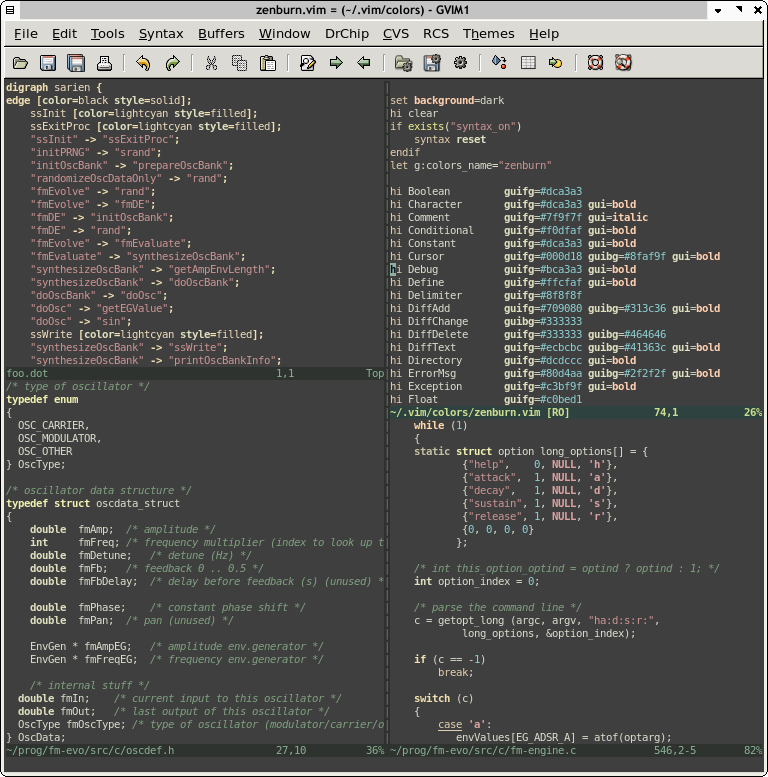
Zenburn is a low-contrast color scheme for Vim. It's easy for your eyes and designed to keep you in the zone for long programming sessions.
Screenshot of Zenburn:
What's the purpose of this page?
The purpose is to collect links to various ports for different utilities and environments and, of course, show a screenshot!
Latest version and background information
Nowadays Zenburn lives at Github.
Notes
To use Zenburn in GVim, simply copy the file to colors/ subdirectory under your Vim configuration folder (e.g. \~/.vim/colors or C:\vim\colors).
To use Zenburn in Vim, you must enable the 256-color mode for
Vim. This can be done with
e.g. export TERM=xterm-256color. You might also need to add
set t_Co=256 into your .vimrc file, before loading the colorscheme.
Note, that due to limitations of the 256-color mode the color scheme is
not exactly like it appears in GVim, but very close nevertheless.
Have a look at Darmawan's page for further information and screenshots.
Old, incomplete list of known ports and derivatives
Note: Some links are broken!
- Zenburn for KDE konsole by Christoffer Sawicki. See also below for Konsole 2.0.
- Daniel Brockman had
a page with many adaptations(Link dead). Daniel's Emacs version still exists at Github. - Zenburn scheme ported to Visual Studio 2005 by Jeff Atwood
- Jakub Piotr Cłapa Zenburnt his entire desktop!
- Zenburn ported to Notepad++ by Dominykas Djačenka.
- SubEthaEdit Zenburn by Henrik Bergius.
- "Dark Zenburn Global Style" for Stylish browser plugin.
- Zenburn for KDevelop/Kate by Lukasz "Lookanio" Purgal.
- Zenburn for KDE3 by Kevin Geiss.
- Putty colors by Steve T.
- Marc Kerbiquet uses Zenburn in his Code Browser software.
- Andrew Janke did a Zenburn-configuration file for Gnome Terminal. See also his comment below.
- Jonathan Bonomo made a color scheme for sterjm (project page). You can download the file here.
- Hisham made a Typo/CSS Zenburn theme.
- Juhapekka Tolvanen made a Zenburn config for ctheme.
- Zenburn for Konsole redux by Craig. It's for Konsole 2.0 (KDE4). Apologies to Craig since I had somehow overlooked his link from the old page.
- Zenburn Blogger template with syntax highlighting for code examples, by Elijahr.
- "Zenburn-like color scheme with terminus/proggyclean fonts for terminals and emacs." Cheers to Nick C for pointing it out.
- Windows cmd.exe port (also for Powershell) by Twinside.
- Adrian C has a whole bunch of Zenburn things, including a Zenburn theme for the Awesome WM - have a look at the simply excellent screenshots! You can read Adrian's journal entry too.
- Abchernin sent information about how to set up for EasyEclipse for Python 1.3.1.
- Gianfranco did Zenburn for SciTE v1.78.
- Gimp palette by an anonymous contributor. It was cool to see all the colours in one place.
- David Beckingsale made a Sandbox derived theme with Zenburn colors, called ZenSandBox.
- Pietra Arumaga has goodies for MacVim and Komodo users: "MacVim as IDE with Code Completion and Syntax Highlighting for Python, PyQt4 and Twisted Development on Mac OSX Snow Leopard" and Zenburn zip for Komodo Edit/IDE.
- Bozhidar Batsov did an Emacs port of Zenburn. Not a rewrite of Daniel Brockman's version. The zenburn-emacs is at Github. He also ported Zenburn to the Jekyll static site generator for Ruby, you can get the css for Jekyll here.
- Dale Anson brings Zenburn to the Lipstik look and feel, as well as a jEdit port.
- Alper Buluc did a Zenburn port to the PHP IDE PhpStorm. Zenburn for PhpStorm at Github.
- Benjamin Esham's Zenburn for Mac OS X built-in terminal link was dead for a time, but is available at Github, zenburn-terminal.
For more links, see the comments below. See also the contribs-branch of Zenburn at Github. If you have made a new port, please drop a comment.
Thank you for enjoying "Just some alien fruit salad to keep you in the zone"!
